mardi 30 juillet 2019

Flash Samsung Stock ROM (Official/Original Firmware) via Odin


Flash Samsung Stock ROM (Official/Original Firmware) via Odin

Step 1: Download and install device driver software on your computer.
If you have used Kingo android Root already, skip this step. Otherwise, do it manually. Following are ways to do this...
  • Visit Samsung official website to find the correspondent driver software.
  • Google the driver software of your device. Download and then install it on you computer.
  • Download or update Kies, part of which will install or update drivers.
Once drivers are installed or updated, it is highly recommended that you restart your computer.
Step 2: Download and extract the Stock ROM (Official/Original Firmware).
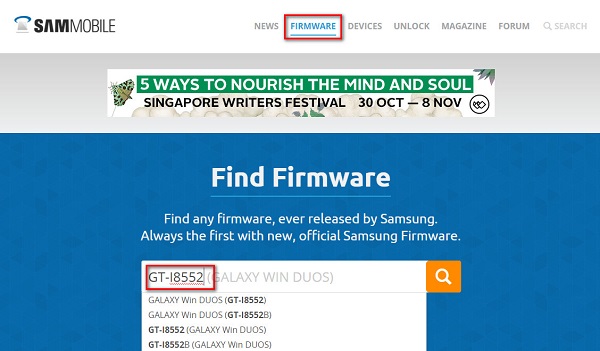
SamMobilemay be the best choice to download stock firmware of Samsung device. Or you can go to Samsung Updates, XDA Forum or Google to find the correspondent firmware of your device.Samung Stock Firmware Download on SamMobile
Click "Firmware" and enter your device model
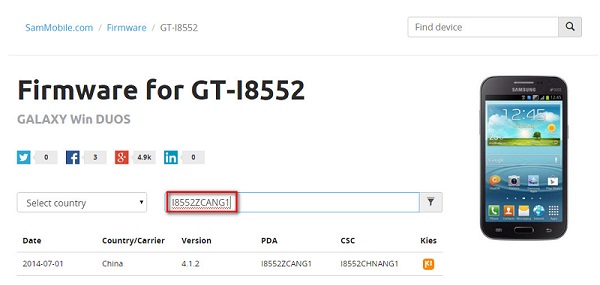
GT-I8552 Stock Firmware Download on SamMobile
Select country or type in certain info to filter, eg.Baseband version.
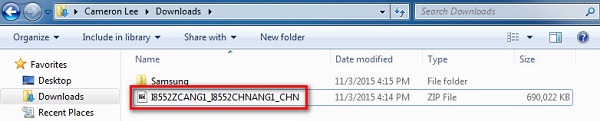
After downloading it (normally a compressed file), you need to extact/unzip it to certain location of your PC. The file types that Odin uses are *.bin,*.tar and *.tar.md5.
GT-I8552 Stock firmware downloaded from SamMobile
Find the file you have downloaded and then unzip it to Desktop.
Unzip GT-I8552 Stock firmware downloaded from SamMobile
You will find a *.md5 file after extracting.
Step 3: Download and extract Odin on you PC.
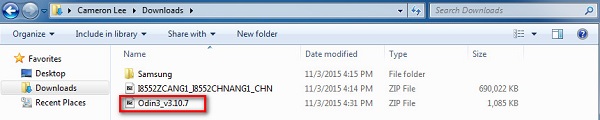
You can download Odin V3.10.7 directly from SamMobileAndroidMTK is a fine alternative, it also offers a detailed list of Odin versions and download link. Or you can always Google "Odin download".    After downloading it on your PC, extract it to Desktop or another location you'd prefer.Odin v3.10.7 downloaded from SamMobile
Odin v3.10.7 zip file.
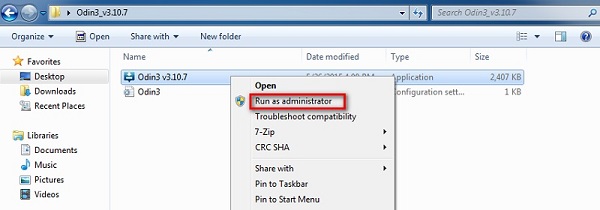
After extracting, right-click to "Open as Administrator". It may prevent certain issue from happening.
Run Odin v3.10.7 as adminitrator
Run Odin as administartor is recommended.
Step 4: Boot your Samsung device into Download mode.
Follow these steps to enter Download Mode/Odin Mode
  1. Power off your device
  2. Press and hold Volume Down key, Home Key and Power Key
  3. When your device vibrates, release Power key while keep holding the Volume Down key and Homekey
  4. Boot into download mode
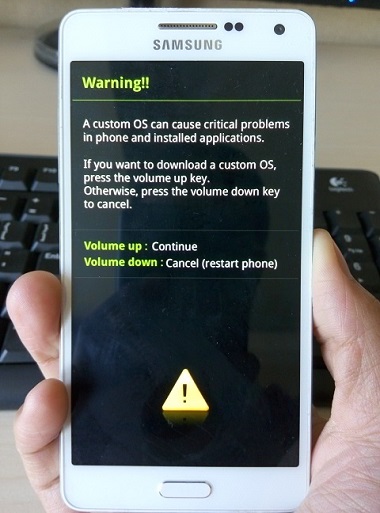
    Warning before entering into download mode
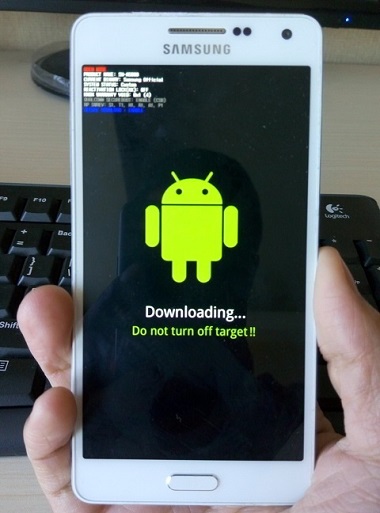
  5. Press Volume Up key to enter Download mode, which has a green robot figure and “Downloading… Do not turn off target!!)
  6. Boot into download mode
    Now you are in download mode.
Step 5: Connect your device to PC.
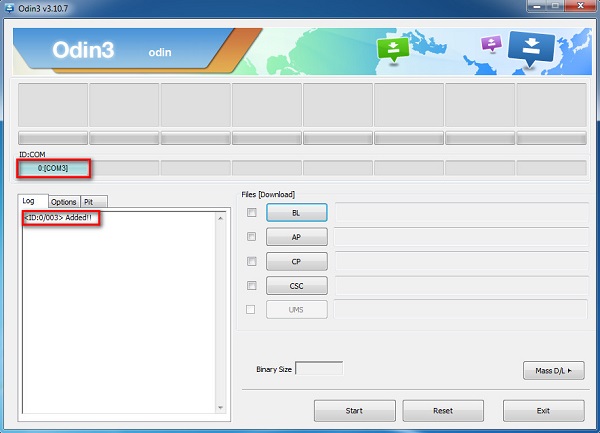
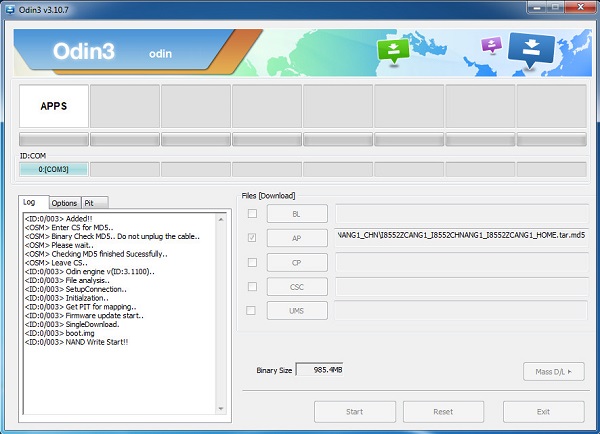
You device should be automatically recognized by Odin. At the lower-left of Odin interface, it should show a message that says "Added!" and in the meantime you should see a light-blue box at the ID:COM section stating "COM:3" (the number depend on which USB port you have plugged the device cable and is irrelevant).
Connect device to Odin
Device is connected to Odin.
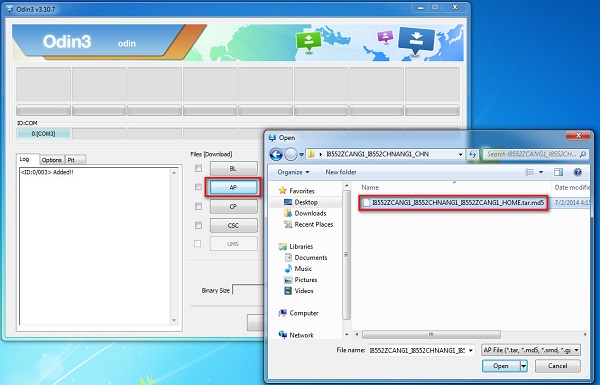
Step 6: Click "PDA" or "AP" to add tar.md5 file that you have extracted and then "Start".
Whether it is "PDA" or "AP" depends on the version of Odin that you used. But the md5 file goes to either "PDA" or "AP".
Add md5 file to Odin
Add *.md5 to Odin.
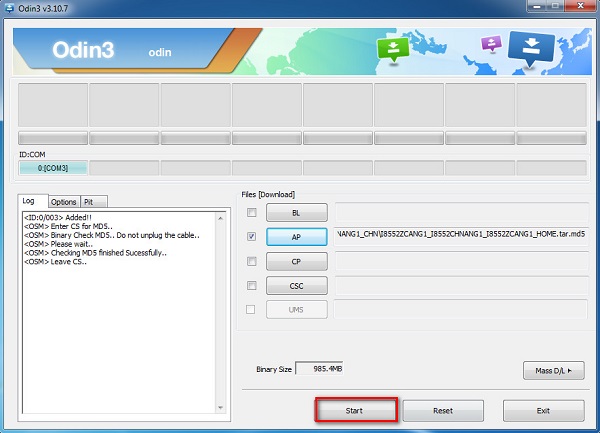
After adding the file, click "Start" to begin the flashing process.
Click start to flash stock rom
Click "Start" to flash.
WARNING DO NOT REMOVE OR OPERATE ON YOUR DEVICE UNTIL FINISHED OR FAILED IS SHOWED ON ODIN.
Starting to flash stock rom via Odin
Ongoing flashing process. Do not remove your device.
When the flashing process is done and if everything goes well, you should see a big green box saying "RESET" or "PASSED" (depends on the version of Odin is used). By now, the device should be rebooted and it is safe to remove/unplug your device.
Succeed to flash stock rom via Odin
Flash succeeded.

If failed, what should you do?

Try these things first:
  • Update your device driver software to the latest.
  • Restart your computer.
  • Run Odin as Administrator.
  • Try different cable (original one or the one with better quality) and USB port (the main port recommended)
  • Re-download the firmware file, make sure it is intact and match your device model

lundi 29 juillet 2019

Best phone in the US for 2019: the top 15 smartphones we've tested


Best phone in the US for 2019: the top 15 smartphones we've tested


best phone 2019 collection of smartphones


The best phone of 2019 in the US is an expensive investment, whether it comes from Samsung, Apple or Google. A lot of these smartphone prices start at $1,000, so you'll want to take your decision seriously. That's why we're here to help guide you.
Today's best phone has a big screen, yet is easy to handle, a camera capable enough to replace a point-and-shoot, and enough horsepower and battery to get work done while you're mobile. You won't find smartphones with slowdown and anything less than all-day battery life on this list.
Tomorrow's top smartphone? That'll probably be a 5G phone, like the Galaxy S10 5G, and then, eventually, a foldable phone with 5G, starting with the Huawei Mate X and Samsung Galaxy Fold. But foldable phones are unproven and 5G in the US isn't in enough cities around the country to recommend. Our list will remain practical.
Why we have more than a No. 1 pick: We have a top pick, but not everyone looks for the same smartphone features. Some will demand iOS 13 and cling to Apple's iMessage, while others will want customizations and Google Assistant tools available in Android Q beta. Our phone reviews and best phone list reflect that diversity. 
Likewise, your contract with AT&T, Verizon, Sprint or T-Mobile is a preference. The best phone for AT&T may not be available on-contract on Verizon, and vice-versa. While we've seen more unlocked phones in the US in 2019, not all are available for every carrier. We have to take that into account when recommending phones, and we favor those that are completely unlocked or available on the four major carriers.
Our pick for best phone isn't just crowning the newest iPhone and calling it a day, though our list does have a lot of familiar names: Apple, Samsung, Google and LG, all in the top 15. Newer companies in the US like Huawei and OnePlus make the list, too, though their limited availability is noted.

The best phone on our list on sale right now

Before we get to our official best phone list below, we mentioned that phones are expensive, so we're updating our list of the best prices for each of the top phones mentioned among the 15 – when they're lower than usual. The iPhone sits at a constant price, typically. Here's how you can save on your purchase.

1. Samsung Galaxy S10 Plus

A big phone with a few new features
Release date: March 2019 | Weight: 175g / 198g (ceramic) | Dimensions: 157.6 x 74.1 x 7.8mm | OS: Android Pie | Screen size: 6.4-inch | Resolution: 3040×1440 | CPU: Snapdragon 855 | RAM: 8/12GB | Storage: 128/512GB/1TB (up to 1.5TB with card) | Battery: 4,100mAh | Rear camera: 12MP + 12MP + 16MP | Front camera: 10MP + 8MP


dimanche 28 juillet 2019

Quand mon téléphone Galaxy recevra-t-il une mise à jour de sécurité?


Quand mon téléphone Galaxy recevra-t-il une mise à jour de sécurité?


Tous les types de logiciels peuvent présenter des vulnérabilités et des failles inattendues, et Android n’est pas différent. En tant que système d'exploitation mobile le plus utilisé, Android est une cible majeure pour les pirates cherchant un moyen d'exploiter ces vulnérabilités afin d'accéder aux données de l'utilisateur et de causer d'autres inconvénients de ce type. Pour éviter les principales attaques de sécurité, Google corrige des vulnérabilités découvertes récemment dans Android à l'aide de correctifs mensuels publiés par différents fabricants de smartphones pour leurs smartphones via des mises à jour de sécurité.

Samsung fabrique le plus grand nombre de smartphones Android et publie des mises à jour de sécurité pour nombre d'entre eux tous les mois. En plus de la correction des vulnérabilités du système d'exploitation Android principal, ces mises à jour corrigent également les vulnérabilités affectant la version personnalisée d'Android de Samsung qui s'exécute sur tous les smartphones et tablettes Galaxy. Toutefois, la publication de mises à jour mensuelles pour tous les appareils de sa gamme étant une tâche presque impossible, Samsung publie de nouvelles mises à jour de sécurité pour certains appareils tous les trimestres (c'est-à-dire une fois tous les trois mois).

En général, ce sont les appareils phares qui reçoivent des mises à jour de sécurité mensuelles et ceux de milieu de gamme et des budgets qui reçoivent des mises à jour trimestrielles, mais ce n’est pas toujours aussi clair. Certains appareils peuvent obtenir des mises à jour mensuelles pendant la première ou les deux années suivant leur arrivée sur le marché, puis être déplacés vers le calendrier trimestriel, alors que certains peuvent être relégués aux mises à jour trimestrielles dès le premier jour. Certains périphériques, en particulier ceux mis en vente il y a plus de trois ans, ne reçoivent des mises à jour de sécurité que lorsqu'une vulnérabilité critique est découverte ou qu'une ancienne vulnérabilité est corrigée.

Quand mon téléphone ou ma tablette Galaxy aura-t-il une mise à jour de sécurité?
Comment savoir à quelle fréquence votre téléphone ou tablette Galaxy est supposé recevoir des mises à jour de sécurité? Vous trouverez ci-dessous une liste de tous les appareils pour lesquels Samsung propose actuellement des mises à jour mensuelles et trimestrielles, ainsi que de ceux qui ne disposent de mises à jour de sécurité que lorsque cela est nécessaire.

Périphériques sur calendrier de mise à jour de sécurité mensuel
Galaxy S8, Galaxy S8 +, Galaxy S8 Active
Galaxy S9, Galaxy S9 +, Galaxy S10, Galaxy S10 +, Galaxy S10e
Galaxy Note 8, Galaxy Note 9
Galaxy A5 (2017), Galaxy A8 (2018)
Dispositifs sur calendrier de mise à jour de sécurité trimestriel
Galaxy S8 Lite, Galaxy Note FE
Galaxy A6, Galaxy A6 +, Galaxy A7 (2018)
Galaxy A8 + (2018), Galaxy A8 Étoile, Galaxy A8s, Galaxy A9 (2018)
Galaxy A2 Core, Galaxy A10, Galaxy A10, Galaxy A20, Galaxy A20, Galaxy A30, Galaxy A40, Galaxy A60, Galaxy A60, Galaxy A70, Galaxy A80
Galaxy J2 (2018), Galaxy J2 Core, Galaxy J3 (2017), Galaxy J3 Top
Galaxy J4, Galaxy J4 +, Galaxy J4 Core, Galaxy J5 (2017), Galaxy J6, Galaxy J6 +
Galaxy J7 (2017), Galaxy J7 Duo, Galaxy J7 Max, Galaxy J7 Neo, Galaxy J7 Top, Galaxy J7 Prime 2, Galaxy J7 +, Galaxy J8
Galaxy M10, Galaxy M20, Galaxy M30, Galaxy M40
Galaxy Tab A (2017), Galaxy Tab A 10.5 (2018), Galaxy Tab A 10.1 (2019), Galaxy Tab A 8 Plus (2019), Galaxy Tab Active 2
Galaxy Tab S4, Galaxy Tab S5e, Galaxy Tab E 8 Rafraîchir, Galaxy View 2
Galaxy Xcover 4s
Périphériques recevant des mises à jour de sécurité uniquement lorsque cela est nécessaire
Galaxy S7, Galaxy S7 Edge, Galaxy S7 Actif, Galaxy A3 (2016), Galaxy A3 (2017), Galaxy A5 (2016), Galaxy A7 (2017)
Galaxy J3 Pop, Galaxy J5 (2016), Galaxy J5 Prime, Galaxy J7 (2016), Galaxy J7 Prime, Galaxy J7 Pop
Galaxy Tab A 10.1 (2016), Galaxy Tab S2 L Rafraîchir, Galaxy Tab S2 S Rafraîchir, Galaxy Tab S3
Pourquoi mon appareil Galaxy ne reçoit-il pas toujours les mises à jour de sécurité dans les délais?
Malheureusement, même si Samsung indique qu'un appareil est programmé pour recevoir des mises à jour mensuelles, il se peut qu'il ne fournisse pas de mise à jour mensuelle pour cet appareil dans tous les pays ou régions. Samsung peut mettre à jour un appareil dans certaines régions au mois d’avril, par exemple, tandis que les propriétaires de cet appareil dans d’autres pays attendent le mois suivant (ou le mois suivant) pour obtenir la dernière mise à jour de sécurité. Parfois, un périphérique peut ne pas recevoir une nouvelle mise à jour de sécurité dans un pays quelconque, conformément au calendrier habituel. Ces retards sont souvent dus au travail de Samsung sur une mise à jour majeure apportant de nouvelles fonctionnalités ou une version plus récente du système d'exploitation Android.

Les opérateurs ont également une incidence sur l'horaire de certains appareils. Par exemple, certains opérateurs peuvent choisir de mettre un appareil sur une base trimestrielle même si Samsung fournit une mise à jour mensuelle pour les unités déverrouillées. Et même Samsung ne suit pas les horaires dans tous les pays. Au Royaume-Uni, par exemple, même les produits phares ne reçoivent parfois pas de mises à jour de sécurité mensuelles. En principe, il n’ya aucune garantie. Bien que Samsung publie des mises à jour de sécurité avec une régularité impressionnante, il est toujours possible qu’un téléphone ou une tablette Galaxy manque de temps en temps de correctifs de sécurité.
Comment vérifier si une mise à jour de sécurité est disponible?
Une mise à jour de sécurité, comme toute mise à jour, apparaîtra sur votre appareil une fois que Samsung la publiera dans votre pays. Vous pouvez également vérifier si une mise à jour est disponible en ouvrant l'application Paramètres sur votre appareil, en accédant à Mise à jour de logiciels, puis en sélectionnant l'option de téléchargement (téléchargement manuel des mises à jour ou téléchargement et installation en fonction de la version de votre système d'exploitation). Sur les appareils plus anciens, le menu de mise à jour du logiciel peut se trouver dans la section À propos de l'appareil de l'application Paramètres.

Si une mise à jour n'est pas disponible en direct depuis votre appareil, vous pouvez en rechercher une mise à jour à l'aide du logiciel Smart Switch de Samsung pour Windows et Mac. Une autre solution consiste à télécharger le micrologiciel le plus récent pour votre appareil et votre pays à partir de notre base de micrologiciels et à effectuer la mise à niveau manuellement à l'aide d'un PC Windows.

Combien de temps puis-je m'attendre à des mises à jour de sécurité pour mon appareil Galaxy?
Comme nous l’avons déjà mentionné, ce sont généralement des appareils phares qui reçoivent des mises à jour mensuelles de la sécurité, tandis que les offres de milieu de gamme et des offres budgétaires en bénéficient tous les trois mois. Mais combien de temps votre téléphone ou votre tablette Galaxy continuera-t-il à recevoir des mises à jour de sécurité? Eh bien, vous pouvez vous attendre à ce que votre appareil respecte le même calendrier pendant les deux premières années suivant son lancement sur le marché. Au cours de la troisième année, un périphérique de la planification mensuelle est rétrogradé en mises à jour trimestrielles et celles programmées trimestriellement ne reçoivent les mises à jour de sécurité que lorsque cela est nécessaire. Samsung a prolongé la période d'assistance pour les mises à jour de sécurité de certains appareils jusqu'à la quatrième année, mais il reste à savoir si cela se produira avec davantage d'appareils.

Cependant, vous n'avez pas à rechercher la date de publication de votre téléphone (ou de votre tablette) pour voir à quelle fréquence il obtiendra des mises à jour de sécurité. Vous pouvez également ajouter cette page à vos favoris et vérifier régulièrement la mise à jour de sécurité prévue pour votre appareil Galaxy. Continuez également à lire SamMobile pour savoir quand un périphérique Galaxy reçoit une nouvelle mise à jour logicielle (mises à jour de sécurité, mises à jour de fonctionnalités et mises à jour importantes du système d'exploitation). Et si cela ne vous gêne pas d’être un peu techniques, vous pouvez visiter le site Web dédié des mises à jour de sécurité Android de Samsung pour obtenir des informations sur les principales vulnérabilités corrigées dans la mise à jour de sécurité mensuelle.
samedi 27 juillet 2019

Smartphones - All Algerian brands threatened with extinction


Smartphones - All Algerian brands threatened with extinction


In an interview with a national media outlet, the president of the Algerian national exporters' association, Ali Bey Naceri, said that several Algerian manufacturers of smartphones and electronics are threatened with the loss of export contracts in the event that the government continues to block the raw material used during the various stages of production.

condor,iris,(Stream System), Enie, Eniem and Salam Electronics (Starlight), are likely to lose up to 130 million Euro of exports if they break their commitments to Arab, African and even European partners. This may lead to the outright closure of the latter, as a direct result of the freeze on imports following the wave of anti-corruption lawsuits that began a few months ago.

Samsung is already testing Android Q for the Galaxy S10


Samsung is already testing Android Q for the Galaxy S10


We’ve discovered that Samsung is already testing Android Q for the Galaxy S10 lineup. Google is yet to reveal what the Q in Android Q stands for, but the fact that Samsung is already testing it for its latest flagships shouldn’t be a major revelation. That’s because Android OEMs get access to all the code for the next major version of Android long before it gets a public release, although Samsung could learn from some of its peers and offer us beta access to the new software sooner than it has in the past.
That said, there’s hope the official Android Q release for the Galaxy S10 lineup will come quickly once the Android Q beta program kicks off. After all, Samsung didn’t take much time to bring the stable Android Pie update to the Galaxy S9 and S9+ after the first beta release had gone live, and that was despite how Pie was accompanied by one of the biggest user interface upgrades for Galaxy devices in recent years. Samsung has also been quite fast with bringing Android Pie to other Galaxy devices, so there’s a solid chance Galaxy S10 owners won’t have a long wait for Android Q, either.

We currently don’t have any information on how far along Samsung is with its progress on Android Q for the Galaxy S10e, Galaxy S10, and S10+ – all we know is that Android Q will introduce version 2.0 of One UI and the Digital Wellbeing improvements that Google has built into the tenth version of the operating system. What other features and functionality the update will include remains to be seen, but we will be sure to let you know as soon as we get more details.

lundi 20 mai 2019

Google cuts the bridges with Huawei

Google has announced that it will discontinue any cooperation with Huawei that requires any transfer of hardware or software except those open source. According to a source close to the company, the move comes against the backdrop of the intention of the US government to strike a blow to Chinese technology companies around the world.


The move will block Android updates coming from its phones and its new phones outside China will lose all the company's services and applications such as Google Play Store, Gmail, Google Maps, Chrome browser and the rest of the Google Android app package. Huawei will not be able to use any Google software for the Android system because it is open source but Google will not provide any technical support.

The move came after US President Donald Trump decided to put Huawei officially on the blacklist of US businesses, which would make it suffer if it tried to engage in any economic activity with any US company. This is not the first time that the US administration has made a similar decision as it has been applied to ZTE before but Google did not take any step then.

Huawei, for its part, has not issued any official data to respond to Google has also did not like the US Chamber of Commerce on the punishment of Trump decisions and how it will affect Huawei and the rest of Chinese companies.

Now all possibilities are open. Huawei can completely abandon the Android system and may only provide alternative service to the Google store.

mardi 14 mai 2019

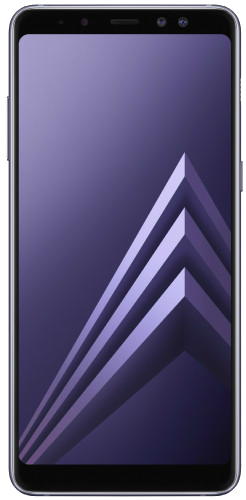
Galaxy S7, Galaxy A5 (2017), and Galaxy A8 (2018) get May 2019 security update

Samsung has been rather quick and regular in releasing monthly security updates to many of its Galaxy devices, and the May 2019 update is no different. It started rolling out said update a week back, beginning with Galaxy A9 (2018) and Galaxy Note 8 and has been steadily adding more devices to the list since then.
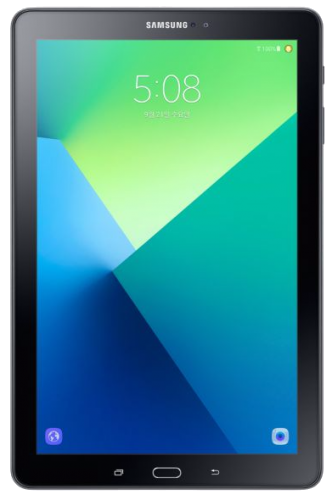
The Galaxy S7 (and S7 Edge), Galaxy A5 (2017)Galaxy A8 (2018), and Galaxy Tab A 10.1 with S Pen (2016) are the latest batch of devices to receive the May update. These devices have started receiving the update in the last couple of days in select markets around the world. As of now, the update for the Galaxy S7/S7 Edge is rolling out in the UK, in Brazil for the Galaxy A8 (2018), in Colombia for the Galaxy A5 (2017), and in South Korea for the Galaxy Tab A 10.1 with S Pen.

Patches seven critical Android OS vulnerabilities

While we cannot confirm for sure, the update appears to bring to nothing more than the latest security fixes. As detailed by Samsung, the May 2019 Security Maintenance Release (SMR) patches seven critical and dozens of high and moderate risk Android OS vulnerabilities, along with 21 Samsung Vulnerabilities and Exposures (SVE) items of varying severities that are specific to Galaxy devices.
Samsung tends to release software updates in phases, so it may not be available to all the eligible devices at once. To check if the update is available for your device, go to Settings and tap on the download option under the Software update menu. If you are impatient to wait for the update, you can download the newest firmware for these devices from our database and manually flash it. You can find the Galaxy S7 firmware here, S7 Edge here, Galaxy A8 (2018) here, Galaxy A5 (2017) here, and the Galaxy Tab A 10.1 with S Pen here.
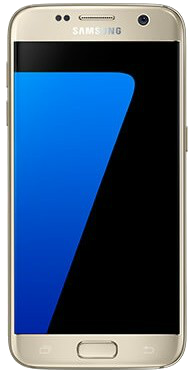
  • Model: SM-G930F
  • Dimensions: 142.4 x 69.6 x 7.9mm
  • Display: 5.1" (129.2mm) Super AMOLED
  • CPU: Exynos 8890
  • Camera: 12 MP, Dual Pixel F1.7
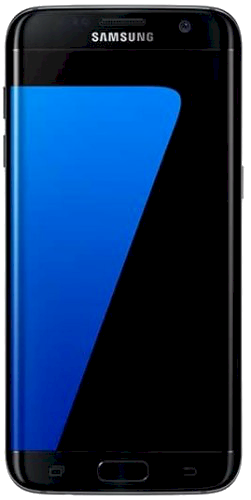
  • Model: SM-G935F
  • Dimensions: 150.9 x 72.6 x 7.7mm
  • Display: 5.5" (139.3mm) Super AMOLED
  • CPU: Exynos 8890
  • Camera: 12 MP, Dual Pixel F1.7
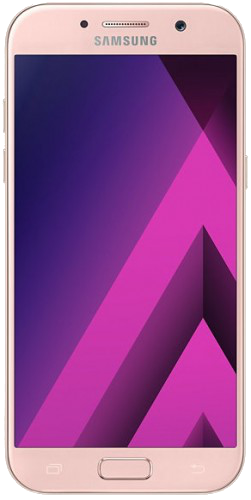
  • Model: SM-A520F
  • Dimensions: 146.1 x 71.4 x 7.9mm
  • Display: 5.2" (132.2mm) Super AMOLED
  • CPU: Exynos 7880 Octa
  • Camera: 16 MP, CMOS F1.9
  • Model: SM-A530F
  • Dimensions: 149.2 x 70.6 x 8.4mm
  • Display: 5.6"(142.0mm) Super AMOLED
  • CPU: Exynos 7885
  • Camera: 16 MP, CMOS PDAF (F1.7)
  • Model: SM-P580
  • Dimensions: 254.3 x 164.2 x 8.2mm
  • Display: 10.1" (255.4mm) TFT
  • CPU: Exynos 7870
  • Camera: 8 MP, CMOS